


Image to DST Embroidery File Conversion for Clean and Accurate Stitching
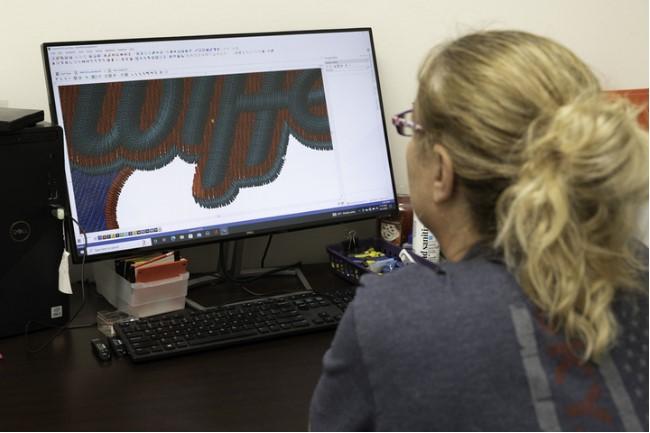
Embroidery begins with a good design, but great embroidery begins with a properly digitized embroidery file. No matter how advanced an embroidery machine is, it cannot read regular image files like JPG, PNG, or PDF. It needs a special embroidery file that contains detailed stitch instructions. A poorly created file can lead to broken threads, uneven stitching, fabric puckering, and wasted materials.
Professional Image to DST Embroidery File Conversion transforms artwork into machine-ready DST embroidery files that produce clean and accurate stitching. Skilled digitizers manually create every stitch instead of relying on automatic software. They carefully adjust stitch types, density, underlay, pull compensation, and stitch direction to match the design, fabric, and embroidery machine. This careful process helps create smooth, professional embroidery every time.
What Is a DST Embroidery File?
A DST file is one of the most popular embroidery file formats.
It is widely used by commercial embroidery machines.
Unlike an image file, a DST file does not contain a picture.
Instead, it stores:
-
Stitch locations
-
Stitch order
-
Needle movements
-
Trim commands
-
Jump stitches
These instructions guide the embroidery machine during stitching.
Why Images Cannot Be Used Directly
Many people believe changing a JPG into a DST file is enough.
It is not.
Image files are made of pixels.
Embroidery machines need stitches.
Every line, shape, and letter must be recreated with stitch instructions.
This process is known as embroidery digitizing.
Why Professional DST Conversion Matters
Good embroidery depends on more than file conversion.
It requires planning and experience.
Professional digitizers understand how different fabrics react during embroidery. A logo stitched on a cotton shirt needs different settings than the same logo on a cap or jacket. Years of embroidery experience help digitizers prevent common production problems before stitching even begins.
Professional conversion helps provide:
-
Smooth stitching
-
Sharp details
-
Better durability
-
Faster machine performance
-
Consistent embroidery quality
How Image to DST Conversion Works
Professional conversion follows several important steps.
Each one improves embroidery quality.
Step 1: Review the Artwork
The digitizer carefully studies the original image.
They examine:
-
Image quality
-
Fine details
-
Small lettering
-
Colors
-
Design size
This helps determine the best digitizing approach.
Step 2: Select the Right Stitch Types
Every part of the design needs the correct stitch.
Satin Stitch
Satin stitches work well for:
-
Lettering
-
Borders
-
Small details
They create smooth, clean embroidery.
Fill Stitch
Fill stitches cover:
-
Large areas
-
Solid shapes
-
Background sections
They provide even thread coverage.
Running Stitch
Running stitches are used for:
-
Thin outlines
-
Decorative details
-
Small accents
Choosing the proper stitch improves both appearance and durability.
Why Underlay Is Important
Underlay is the hidden stitching beneath the visible embroidery.
It provides support for the top stitches.
Good underlay helps:
-
Hold fabric in place
-
Reduce movement
-
Improve stitch quality
-
Prevent shifting
Without proper underlay, embroidery may become uneven.
Stitch Density Controls Quality
Density refers to how closely stitches are placed together.
Too much density may cause:
-
Thread breaks
-
Stiff embroidery
-
Needle heat
Too little density can create:
-
Gaps
-
Weak coverage
-
Poor-looking designs
Professional digitizers carefully balance stitch density for every project.
Pull Compensation Keeps Designs Accurate
Fabric naturally stretches while stitching.
Pull compensation helps maintain the original shape.
Without it:
-
Circles become oval
-
Letters become narrow
-
Borders become uneven
Experienced digitizers adjust pull compensation according to the fabric and stitch direction.
Stitch Direction Improves Appearance
The direction of stitches affects how embroidery looks.
Changing stitch angles helps:
-
Create depth
-
Improve texture
-
Reflect light evenly
-
Reduce visible gaps
These small adjustments create cleaner embroidery.
Why Automatic Conversion Often Fails
Many software programs promise instant embroidery files.
However, automatic conversion often produces poor results.
Common problems include:
-
Rough edges
-
Poor stitch paths
-
Missing details
-
Incorrect density
Manual digitizing creates far better embroidery.
Experienced digitizers carefully build every stitch.
Different Fabrics Need Different Settings
Every fabric behaves differently during embroidery.
Cotton
Cotton is stable.
Standard settings usually work well.
Performance Fabrics
Stretch fabrics often require:
-
Lower stitch density
-
Extra pull compensation
-
Strong stabilizers
Jackets
Heavy fabrics may need stronger underlay.
Hats
Caps require:
-
Center-out stitching
-
Larger lettering
-
Strong support stitches
Professional digitizers adjust every file based on the material.
Common Problems Caused by Poor DST Files
Poor embroidery files often create production issues.
Thread Breaks
Incorrect stitch paths place extra stress on the machine.
Fabric Puckering
Heavy density pulls fabric together.
Uneven Lettering
Small text becomes difficult to read.
Lost Details
Automatic software often removes fine artwork.
Professional digitizing greatly reduces these problems.
Benefits of Professional DST File Conversion
High-quality DST files provide many advantages.
Better Stitch Quality
Designs appear clean and sharp.
Faster Machine Performance
Machines run more efficiently.
Less Material Waste
Good embroidery files reduce damaged garments.
Consistent Results
Repeat orders produce matching embroidery every time.
Consistency is very important for business branding.
Where DST Files Are Used
DST files are widely used for many embroidery projects.
Company Uniforms
Professional logos improve brand identity.
Hats and Caps
Proper digitizing creates cleaner stitching.
Jackets
Large embroidery remains balanced.
Sports Apparel
Team logos stay consistent across every garment.
Promotional Products
Professional embroidery increases product value.
Choosing the Right DST Conversion Service
Selecting an experienced company improves embroidery quality.
Look for these important qualities.
Manual Digitizing
Avoid fully automatic conversion.
Manual work delivers better results.
Skilled Digitizers
Experience improves stitch quality.
Fast Turnaround
Reliable delivery helps keep production on schedule.
Quality Testing
Sample stitching helps identify small problems before delivery.
Helpful Customer Support
Good communication makes revisions easier.
Many embroidery businesses choose Absolute Digitizing because every embroidery file is manually digitized with close attention to detail, stitch quality, and machine performance.
Tips Before Sending Your Artwork
Preparing your artwork helps achieve better embroidery.
Use a High-Resolution Image
Clear images contain more useful detail.
Share the Final Size
Finished size affects stitch settings.
Mention the Fabric
Fabric information helps optimize the embroidery file.
Keep Small Text Simple
Very small lettering may need slight adjustments for better readability.
Why Human Experience Still Matters
Embroidery software continues to improve every year.
However, software cannot replace professional experience.
Experienced digitizers understand:
-
Fabric movement
-
Thread behavior
-
Machine limitations
-
Stitch balance
-
Underlay selection
-
Efficient stitch sequencing
These skills create embroidery that stitches smoothly and looks professional.
Conclusion
Professional DST file conversion is the key to clean, accurate, and reliable machine embroidery. Every stitch type, density adjustment, underlay, stitch direction, and pull compensation setting plays an important role in the final result. A carefully digitized DST file helps reduce production problems while creating embroidery that looks sharp and lasts longer.
Whether you need embroidered logos for uniforms, hats, jackets, sportswear, or promotional products, investing in professional file conversion is one of the best decisions you can make. Experienced companies like Absolute Digitizing create machine-ready DST embroidery files that deliver consistent stitch quality, smooth machine performance, and professional embroidery results on every project.
